Main Concepts
Understanding the main concepts in aTimeLogger is crucial for maximizing its functionality and customizing it to fit your specific needs. Once you grasp these concepts, everything becomes clearer, and you can leverage the full power of the app.
Activity type
- Definition: Represents the type of activity, such as Sleep or Work
- Fields:
- Name
- Icon (50+ built-in icons)
- Color (used as color in pie charts and widgets)
- Tags
- Occurrence types, for things you count rather than time
- Parent group (optional)
Activity
- Definition: An entry containing information about the activity type, start time, recorded intervals, tags, and comments
- Fields:
- Activity Type
- Start Time (if it's running now)
- Intervals (can have multiple intervals for pause/resume functionality)
- Tags
- Comment
- Custom field values (optional)
- State: running, paused or stopped. Running and paused activities are on the Activities tab; a stopped one leaves it and is found in History
Interval
- Definition: An entry with Start and Finish fields that belongs to an activity
Why Use Intervals? The ability to pause and resume activities is the main reason for using intervals. This feature is particularly useful for activities that are interrupted for short periods. For example, during a workday, you might pause Work for a meeting or a break and then resume it, maintaining a continuous record of the Work activity.
Occurrence Type
- Definition: A special type of activity that tracks count rather than duration
- Example: "Took medicine", "Drank water", "Completed a task"
- Behavior: One-tap logging without timer. Shows count instead of duration.
Group
- Definition: A way to organize activity types into groups and sub-groups, enhancing the structure and statistical analysis
- Analogy: Similar to folders containing files and subfolders
Only activity types can be logged, not groups
Tags
- Definition: Additional information about an activity or activity type that extends analytics capabilities.
- Features:
- Free-form text
- AutoComplete suggests existing tags
- Multiple tags per activity
- Filter statistics and goals by tags
Example
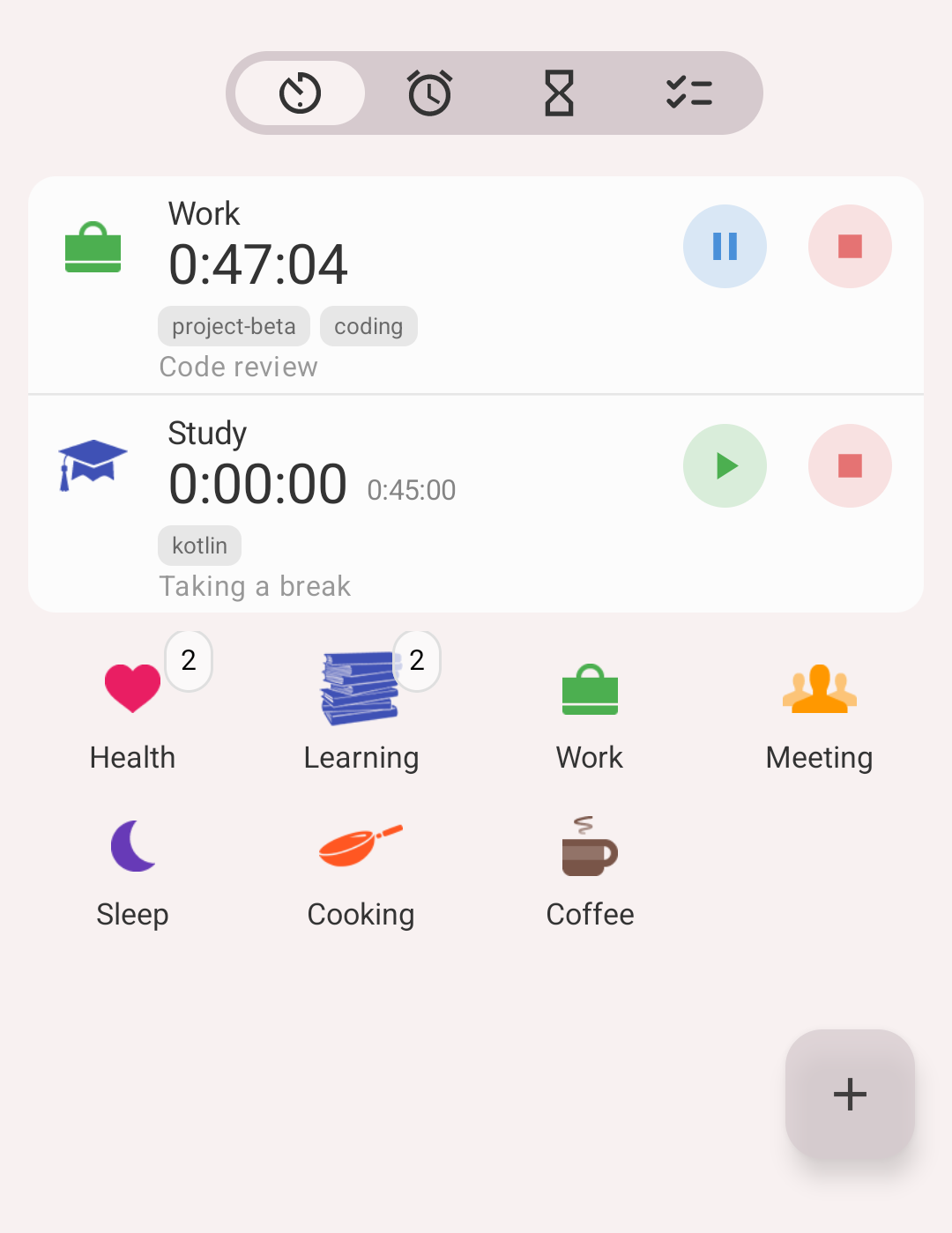
The Activities tab
Here is what the Activities tab above shows:
- Work is running. Its timer shows how long it has been going: 47 minutes. Under the name are its tags, project-beta and coding, and its comment, Code review. The blue button pauses it, the red one stops it.
- Study is paused. 45 minutes are already recorded in it: that is the small timer, 0:45:00. The big timer shows the time since the last start, and nothing runs during a pause, so it reads 0:00:00. The green button resumes Study, and the new interval is added to the same activity. Study is in the Learning group, has the tag kotlin and the comment Taking a break.
- Below them is the grid of activity types. Health and Learning are groups: the number on a group is how many types it holds, and tapping it opens them. Work, Meeting, Sleep, Cooking and Coffee are types: tap one to start it. Coffee is an occurrence type, so a tap counts one coffee instead of starting a timer.
- There are no stopped activities here: once stopped, an activity leaves this tab and is found in History.