Main Concepts
aTimeLogger keeps your time in a few kinds of things: activity types, groups, activities, intervals and tags. Once you know how they fit together, the rest of the app is easy to follow.
Activity type
An activity type is something you track: Work, Sleep, Reading. It has a name, an icon and a colour, and the colour marks it in charts. It can also have tags and custom fields.
You start tracking by tapping a type on the Activities tab. You create and change types on the Types screen of the More tab. See Types and Groups.
An occurrence type records that something happened, not how long it took: a coffee, a pill, a glass of water. Its records have a time but no duration, and statistics count them. Occurrence types are a premium feature.
Group
A group holds activity types, the way a folder holds files. It can hold other groups too. In the pictures of this guide, the Health group holds Exercise and Meditation, and Learning holds Study and Reading.
You can't track a group itself, only the types in it. In statistics, a group adds up the time of everything inside it.
Activity
An activity is one record of a type: a night of sleep, a morning of work. It has:
- its type, which you can change later;
- a state: Running, Paused or Stopped;
- one or more intervals;
- tags and a comment, if you want;
- the values of the custom fields linked to its type.
Running and paused activities are rows at the top of the Activities tab. A stopped one leaves that tab. History lists them all.
Interval
An interval is a stretch of time with a start and an end. Every activity is made of intervals.
Starting an activity opens its first interval. Pausing closes it, and resuming opens a new one in the same activity. So a working day with a lunch break can be one Work activity with two intervals, 9:00–12:00 and 13:00–18:00, and the lunch hour isn't counted.
History shows each interval as a row of its own, and statistics add up the time of the intervals.
Info
Pause or stop? Pause when you will come back to the same thing: its time keeps adding up in one activity. Stop when it is over. Both close the interval, so its time shows in History at once.
Tags
A tag is a label: a project, a client, a book. Put tags on an activity to describe that one record, or on an activity type to describe all its records. Tags filter History and Statistics, show time per tag and narrow goals down. See Tags.
Comment
A comment is free text on an activity, such as what you worked on. It shows under the activity on the Activities tab and in History, and the search on the History tab finds it.
An example
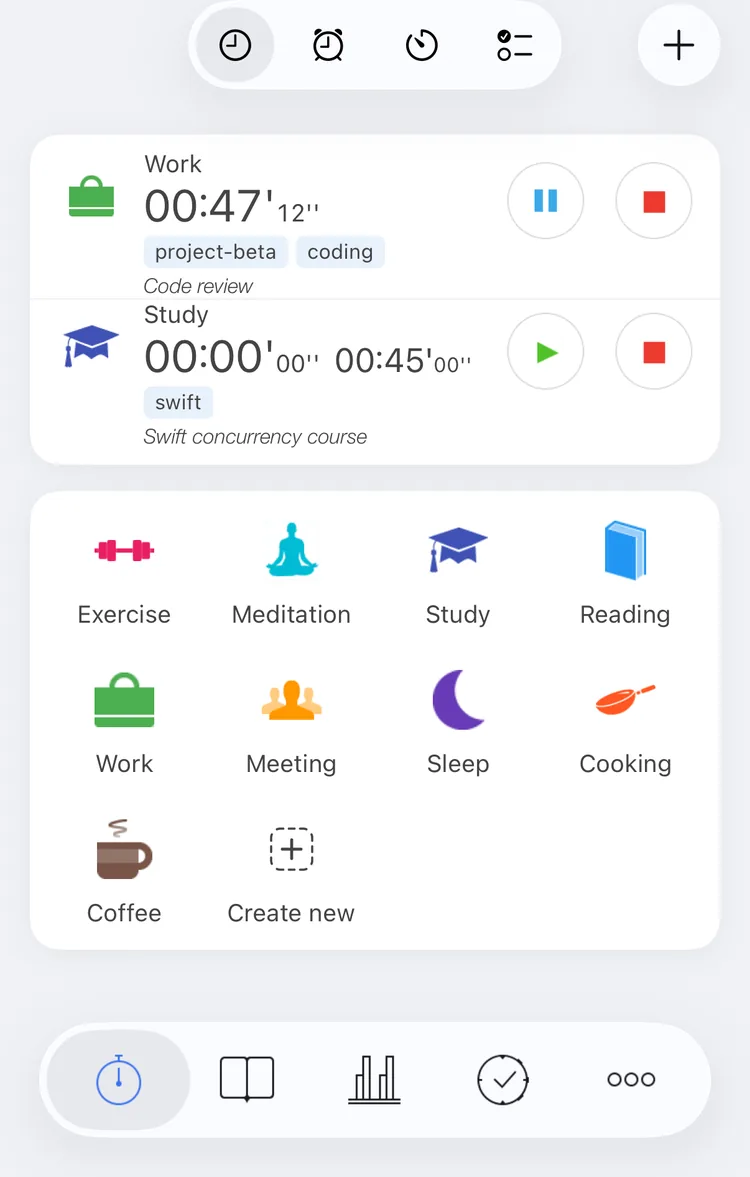
The Activities tab
- Work is running and recording time.
- Study is paused: its recorded time is kept, and Resume adds another interval to the same activity.
- When you Stop an activity, it leaves this tab. Its recorded time stays in History.