Settings
Open More → Settings. Use this page to find the setting you need. Links lead to more detailed instructions.
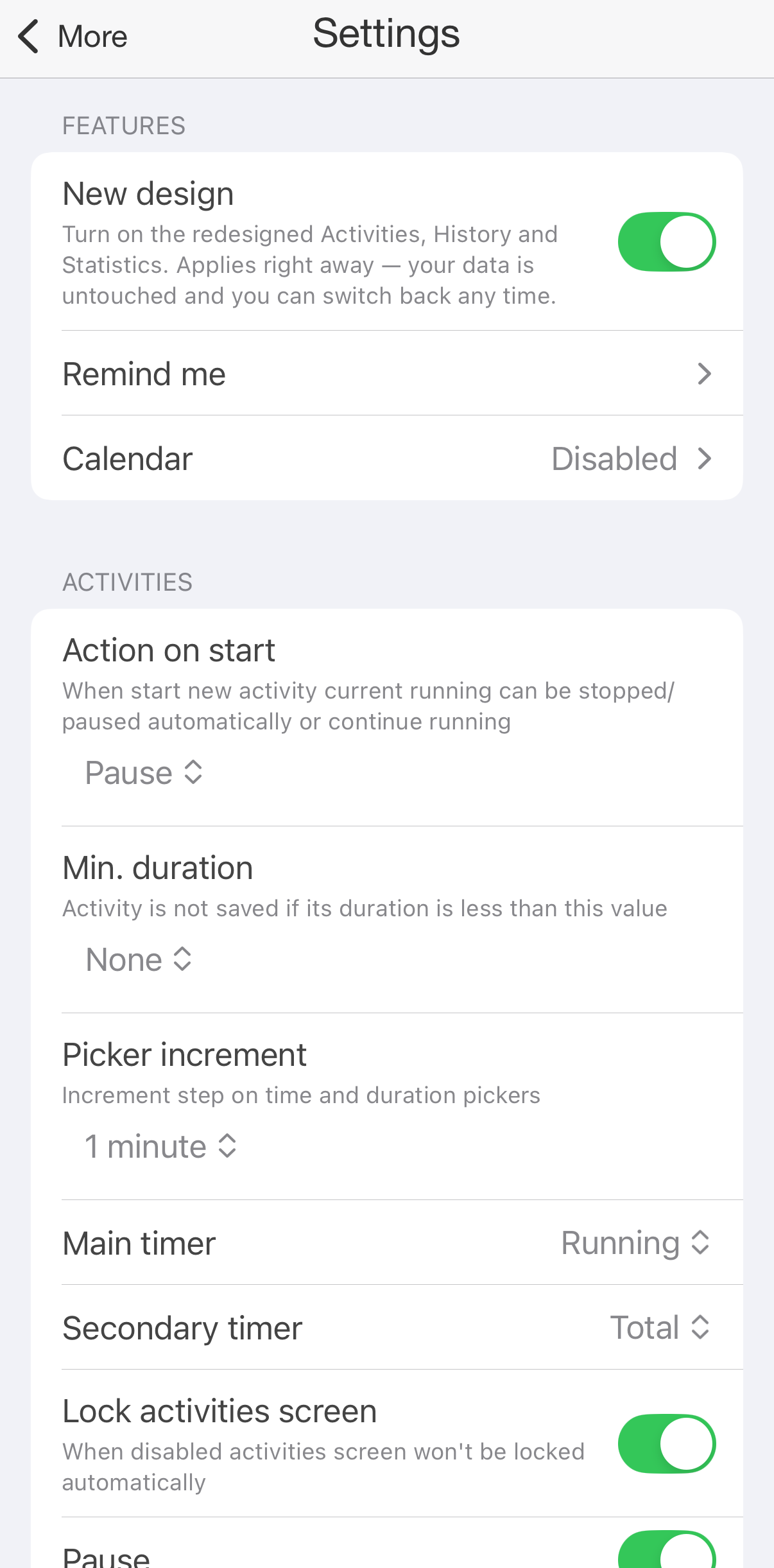
Settings
Without premium, the premium settings are marked PRO, and a premium choice in a list has a lock. Choosing it opens the offer instead.
Apple Health has its own settings, under More → Apple Health. Pomodoro and the countdown have theirs behind the gear button of their mode on the Activities tab. See Apple Health, Pomodoro and Countdown Timer.
Features
- Remind me: notifications that remind you to track your time, at the hours and interval you choose. Off by default. See Remind Me.
- Calendar: posts your records to calendars on the iPhone. Off by default; a premium feature. See Calendar.
Activities
- Action on start: what happens to the running activities when you start another one: Pause (the default), Stop or None. See Activities.
- Min. duration: discard activities shorter than the duration you choose. Off by default. See Activities.
- Picker increment: the minute step when choosing times or a goal's duration. A larger step makes it quicker to select rounded times.
- Main timer: the big timer of an activity: Running (the default) or Total. See Activities.
- Secondary timer: the small timer: Total (the default), Running, No timer or Goal progress. See Activities.
- Lock activities screen: on by default. Turn it off to keep the screen on while the Activities mode is open. See Activities.
- Pause: on by default. Turn it off and activities have only the Stop button. See Activities.
- Groups on activities tab: on by default. Turn it off to show every type in the grid, without groups. See Activities.
- Full path for type: the activities at the top of the Activities tab show their group too, like Project 1/Documentation. Off by default. See Activities.
- Intervals on activities tab: an activity also lists its last intervals. Off by default; a premium feature. See Activities.
Warnings
- Warn on actions: the app asks before it starts, pauses, resumes or stops an activity. Off by default. See Activities.
- Warn on intersection: when a record you save overlaps another one, the app offers to shorten the other. Off by default; a premium feature. See Activities.
History
- History order: Descending, the newest day first (the default), or Ascending. CSV exports follow the same order. Ascending is a premium feature. See History.
Appearance
- Light mode theme: the colours while the iPhone is in light mode.
- Dark mode theme: the colours while the iPhone is in dark mode. The Black theme requires premium in either mode.
- Navigation: Tab Bar (the default), the tabs at the bottom of the screen, or Left Menu, a side menu instead. Changing it is a premium feature, and it applies after you restart the app.
- Icons per row: how many type tiles the Activities tab shows in a row. Changing it is a premium feature. See Activities.
- Application icon: choose the app's icon on the Home Screen.
Formatting
- Date format: how dates are written. Each choice shows a preview with today's date.
- Time format: 12-hour with AM and PM (the default), or 24-hour.
- CSV Date Format: your own format for the dates in exports, written with letters such as dd, MM, yyyy, HH and mm. The screen shows today in your format and lists the letters; tap Save to keep it. Left empty, exports use the date and time formats above.
Advanced
- Comment on start and Comment on stop: the types for which a sheet asks for a comment and tags when you start or stop them. Disabled by default, with no types chosen. See Activities.
- First day of week: the day weeks start on in statistics and goals. By default, the one of your iPhone's region.
- Statistics calculation: how statistics count time when activities overlap. With intersections (the default): the time they overlap is counted once, as an entry of its own for the overlapping types. Without intersections: each activity counts all of its time, so overlapping time counts more than once. Without intersections is a premium feature. See Statistics.
- Separate groups column in csv report: CSV exports put each type's group in a column of its own. Off by default.
- Display seconds: times and durations in exports and in More → Reports include seconds. Off by default.
- URL Scheme: the type editor gets Start URL, Stop URL, Pause URL and Resume URL, and the app opens a type's URL when you start, stop, pause or resume an activity of it on the Activities tab. Off by default. See Types and Groups and Automation.
- Day start: when your day begins in Statistics, History and goals. Move it from midnight to keep a night's sleep or a late shift in one day. A premium feature. See Goals.
- Multi-Day Records: a record that crosses midnight is listed on the day that holds most of it (Show Primarily on Main Day, the default) or on every day it touches (Show on Both Days). A record of 12 hours or more is listed on every day either way.
- Comments auto completion: suggest earlier comments as you type. Period controls how far back to look. Off by default; turning it on is a premium feature. See Activities.
- Fixed height of comments: an activity on the Activities tab shows only the first line of its comment. Off by default.
- Hide inherited type tags: tags an activity gets from its type are not shown on it. Off by default. See Tags.